
Description
If you want to buy an AWS account that can actually run something the day it arrives, this is the tier that fits most people. A 32 vCPU AWS account is the practical floor for real work — enough concurrent compute to hold a production stack, a database, a handful of workers, a staging copy and a CI runner without ever touching the ceiling. It is, in our experience, the tier the overwhelming majority of customers need and very few ever outgrow.
It is also the tier we most often recommend to people who came here intending to spend more.
Why a brand-new AWS account will not do this job
Opening an Amazon Web Services account costs nothing, which makes buying one sound faintly ridiculous — right up until you try it. The signup is free. The usable account is not.
What stops people is rarely one dramatic failure. It is an accumulation of small ones: a corporate card declined three times with no explanation attached, an identity review that sits in “pending” for nine days, a phone verification that never arrives. And then, for the people who make it through, the final insult — a fresh account whose default service quota is so conservative that the instance the entire project was designed around simply will not launch.
That is not a bug. New-account quotas are deliberately small because AWS has no history with you and abuse arrives on new accounts at scale. It is a sensible policy that happens to make a brand-new account useless for serious work on day one. You can file a quota increase. It may take days. It may be refused without a reason you can act on. Neither outcome cares that your client expects a demo on Thursday.
Buying a cleared account removes that entire sequence. Everything painful has already happened — to us, not to you.
What you get when you buy this AWS account
This is not a shell with homework attached. It is a console you can log into and use immediately.
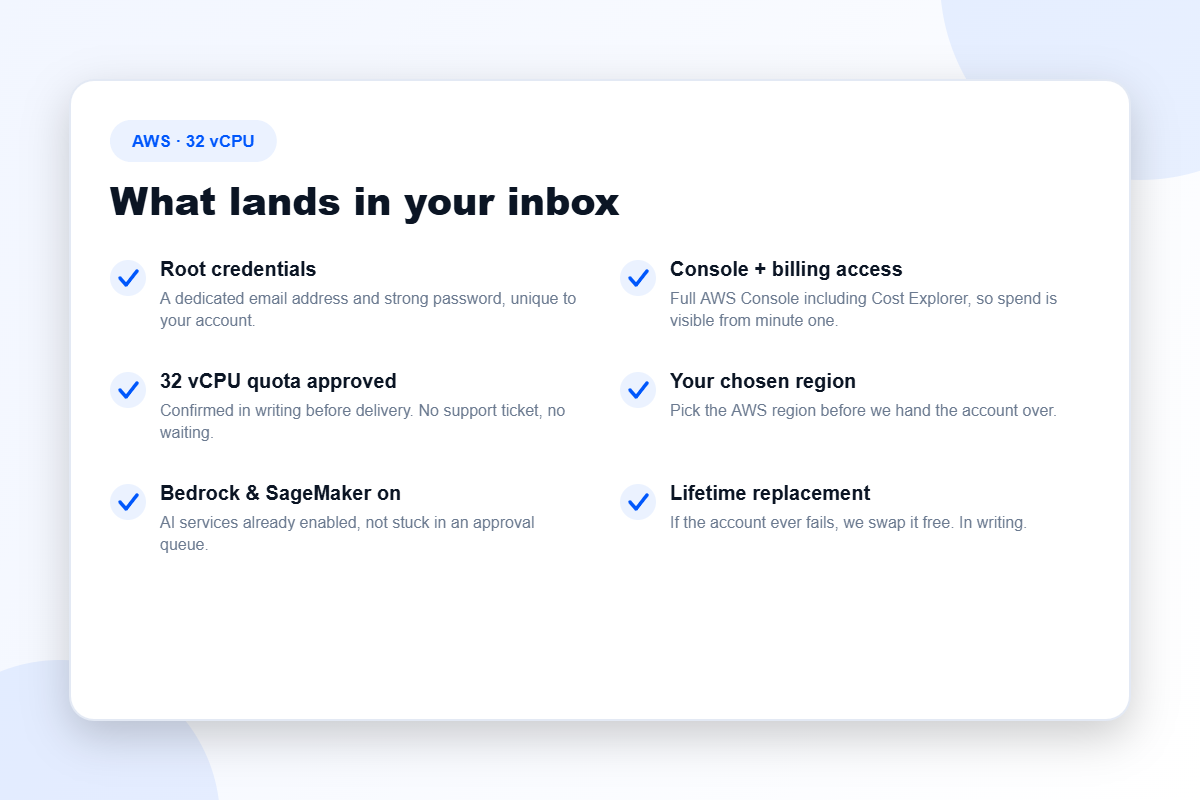
- Root user credentials. A dedicated email address and a strong password, unique to your account and nobody else’s.
- Full AWS Console access, including the Billing Dashboard and Cost Explorer — so your spend is visible from minute one rather than discovered at the end of the month.
- A confirmed 32 vCPU quota, already approved. Not “we can request it”. Approved, in writing, before the account reaches you.
- The AWS region you asked for, chosen before delivery and matched to your latency and data-residency requirements.
- Amazon Bedrock and SageMaker enabled. AI service access is its own separate approval queue on a fresh account, and it catches an enormous number of people out. You skip it.
- A free lifetime replacement, written into the order rather than implied by a friendly sentence on a homepage.
Understanding the 32 vCPU limit (it is not what most people assume)
The single most common misunderstanding we correct is this: your vCPU quota is not a monthly allowance. It is a ceiling on how much compute can run at the same time. It is a concurrency limit.
Run one 32-vCPU instance and you have consumed the entire quota — for as long as that instance stays up. Run four 8-vCPU instances and you have done the same thing. This is why the limit bites at precisely the worst moment: not while you are experimenting, but when you scale out and everything needs to be running simultaneously.
What 32 vCPU comfortably runs
- A production web application and API, with room for traffic spikes
- A managed database plus a cache layer
- Several background workers or queue consumers
- A staging environment that mirrors production closely enough to be useful
- CI runners that do not fight your production workload for capacity
- Light-to-moderate data processing and batch jobs
When 32 vCPU is genuinely not enough
Be honest with yourself here, because guessing upward is expensive and guessing downward is worse. If you are training models of any real size, running high-throughput analytics, rendering, or operating many client environments in parallel, you will hit this ceiling and you will hit it fast. Step up to the AWS 64 vCPU account when concurrency is your constraint, or the 128 vCPU account when raw capacity is.
Our full walkthrough of how these ceilings actually behave is in this guide to AWS service quotas — worth ten minutes before you commit money in either direction.
Choosing your tier
Every account on this page opens into several options at checkout. They are not upsells for the sake of it; they solve genuinely different problems.
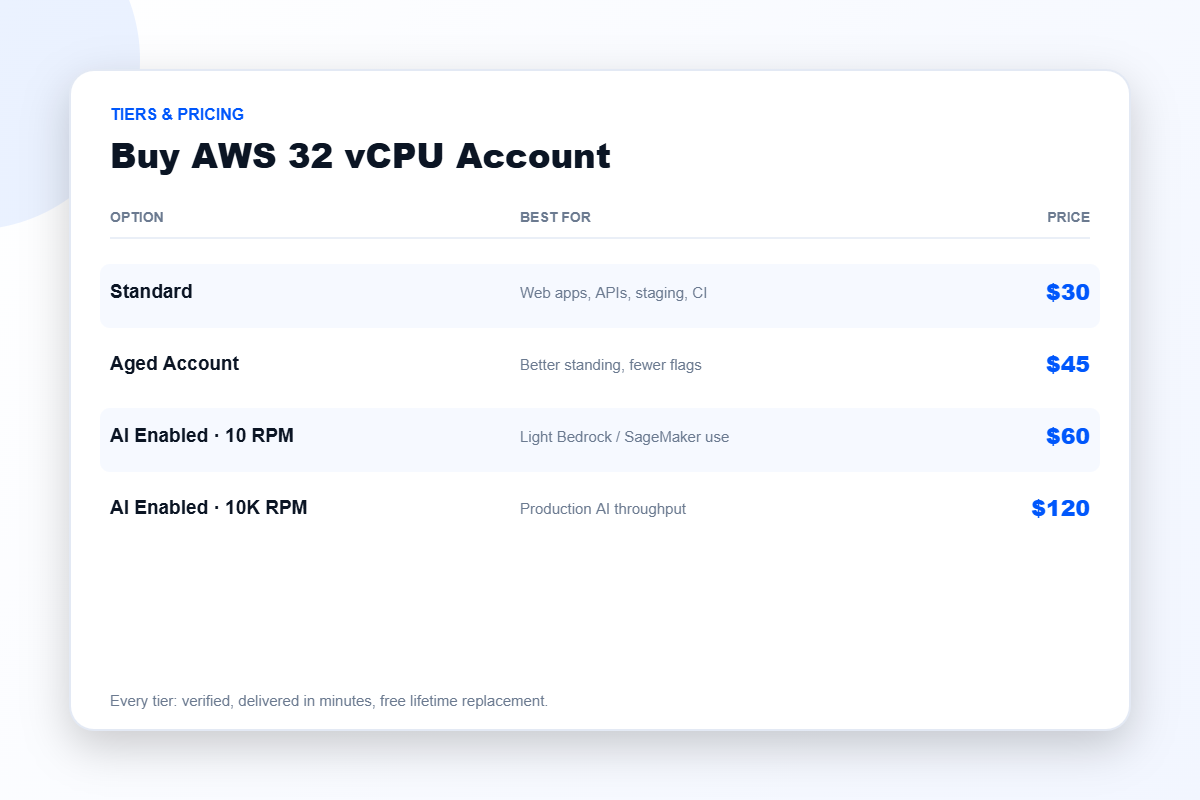
Standard — $30
A clean, freshly verified account with the 32 vCPU quota approved. This is the right choice for the large majority of buyers: web applications, APIs, staging environments, CI, and small-to-medium data work.
Aged Account — $45
An account with genuine age and usage history behind it. Older accounts tend to attract fewer automated flags and sit in better standing with the platform’s risk systems. If you have been burned before by an account behaving unpredictably under scrutiny, the extra fifteen dollars buys you a calmer life.
AI Enabled · 10 RPM — $60
Bedrock and SageMaker access configured for light request throughput. Suitable for prototyping with foundation models, evaluation work, and low-volume inference where you are not yet serving real users at scale.
AI Enabled · 10K RPM — $120
Substantially higher request-per-minute throughput on AI services. This is the tier for teams actually shipping AI features to production, where rate limits — not compute — become the thing that breaks you.
How delivery works
Fulfilment is automated, which is the only honest way to promise speed. Our median from cleared payment to working console is roughly nine minutes, and it holds at four in the morning on a Sunday because no human being is in the loop.
- Choose your tier from the dropdown above and complete checkout.
- Payment clears and the order is confirmed instantly.
- Credentials arrive by email — root login, console access, region confirmation.
- Sign in and deploy.
Occasionally something goes wrong after handover. Cloud platforms are not perfectly deterministic and we are not going to pretend otherwise. What we can commit to is the response: one message to our support team and the account is replaced free of charge. No proof-of-purchase archaeology, no argument, no silence.
Is it safe to buy an AWS account?
It is a fair question and it deserves better than a sales answer. The risk in this market has never really been the concept — it is the counterparty. Bad sellers share an identifiable pattern: no support channel that survives payment, no replacement policy written down anywhere, pricing that makes no economic sense, and total silence on whether verification was ever actually completed.
Judge us against exactly that list. Every account is verified before it is listed. The guarantee is written, not implied. Support answers before you pay — which you can confirm in about two minutes at zero cost, and which remains the single most useful signal about any seller in this market, ours included. Our full vetting checklist, including the parts that are uncomfortable for us, is in this article.
Frequently asked questions
Is the account verified before I receive it?
Yes. Identity and billing verification are completed before an account is ever listed for sale. You are not inheriting somebody else’s half-finished signup.
Can I choose the AWS region?
Yes, and you should. Quotas are granted per region — a 32 vCPU ceiling in Frankfurt buys you nothing in Virginia. Tell us where you are deploying before you order and we will set it up correctly.
How quickly will it arrive?
Typically under ten minutes from cleared payment. Delivery is automated and runs around the clock.
What if the account stops working?
Contact support and we replace it free, for as long as the account is yours. That is a written policy, not goodwill.
Should I buy a bigger tier just in case?
Probably not. List everything that runs concurrently, sum the peak vCPU usage rather than the average, add roughly thirty percent for spikes and rolling deploys, and round up. If that lands under 32, buy this one and stop optimising. If you are unsure, describe the workload to us — we will tell you honestly, including when the answer costs us the larger sale.
Related accounts
Need more concurrency? See the 64 vCPU and 128 vCPU accounts. Need compute cost rather than compute access solved? An AWS account with credit is likely the cheaper path. Browse everything in AWS accounts or across all cloud providers — and if a cheaper platform genuinely fits your project better, we will say so.
Disclaimer: BuyAWSAc.com is an independent reseller. We are not affiliated with, authorised by, or endorsed by Amazon Web Services, Inc.. All trademarks are the property of their respective owners. Buying a cleared account saves you the verification queue; it does not transfer responsibility. You remain accountable for operating within the platform’s terms of service and for whatever you deploy.
Reviews
There are no reviews yet.