
Description
Most people who buy an AWS 64 vCPU account are not trying to run one enormous machine. They are trying to run several things at once without those things strangling each other — and that is a completely different problem from raw horsepower.
This is the tier where production stops competing with staging, where CI runners stop stealing capacity from the API, and where a batch job at 2am no longer means somebody gets paged. If your 32 vCPU ceiling has started to feel like a queue rather than a limit, this is the account you actually need.
The moment you outgrow 32 vCPU
It almost never announces itself. Nobody wakes up needing 64 virtual CPUs. What happens instead is quieter and more annoying: a deploy goes out and briefly runs the old and new instances side by side, and the new ones cannot start. A nightly analytics job now overlaps with the morning traffic ramp. A second client environment gets stood up and suddenly the CI pipeline is waiting in line behind it.
None of those are capacity problems in the ordinary sense. Each individual workload is small. The problem is concurrency — everything wanting to exist simultaneously — and it is the single most misunderstood thing about AWS service quotas.
Your quota is not a monthly budget you draw down. It is a hard ceiling on what can be running at the same moment. Cross it and the launch simply fails, usually during a deploy, usually when someone is watching.
What is included
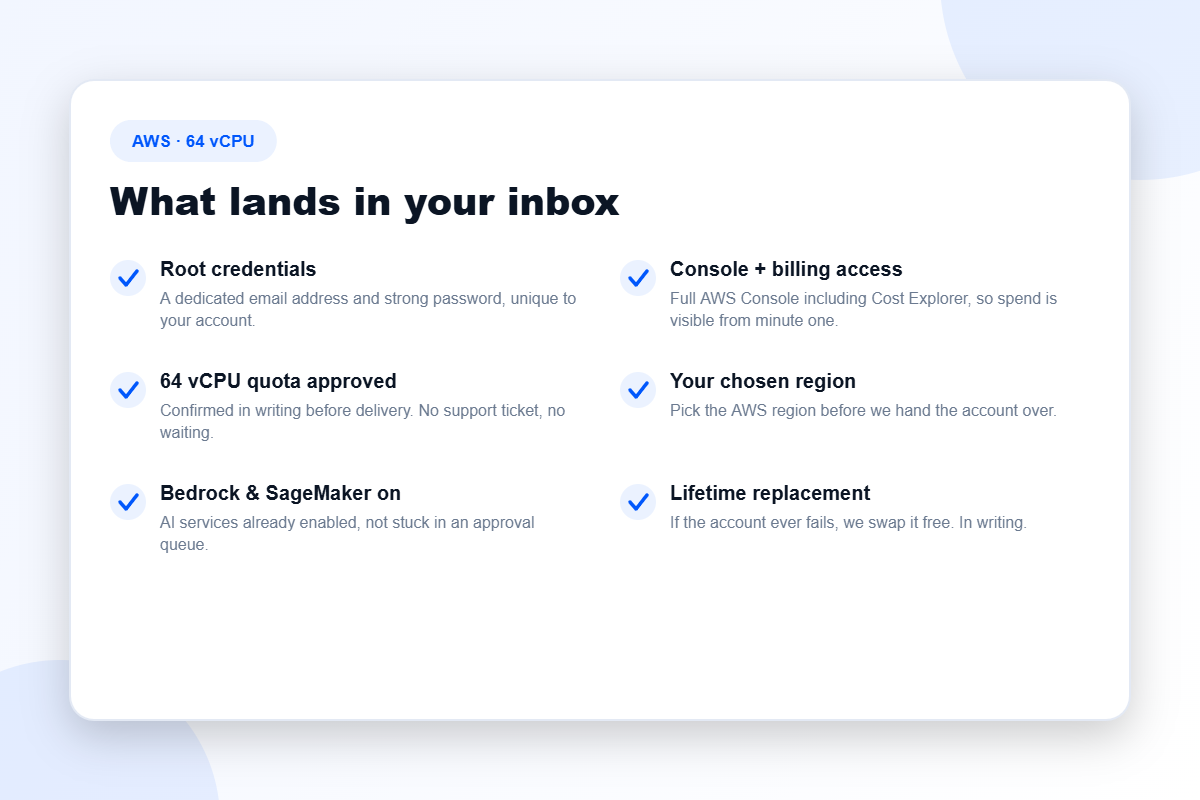
- Root credentials — a dedicated email address and strong password, unique to your account.
- Full console and billing access, Cost Explorer included, so a runaway instance is visible the same day rather than the following month.
- A 64 vCPU quota, already approved and confirmed in writing before the account is handed over.
- Your chosen AWS region — because quotas are regional, and getting this wrong is the most expensive small mistake in cloud procurement.
- Bedrock and SageMaker enabled, so AI services are not sitting behind their own separate approval queue.
- Free lifetime replacement, stated in writing on every order.
Who this account is really for
Agencies and studios running multiple clients
This is the classic case. Every client wants an isolated environment; none of them want to hear that their deploy is blocked because another client’s build is running. 64 vCPU gives you enough concurrent headroom to keep separate environments genuinely separate.
Teams with a real CI/CD pipeline
Continuous integration is enormously spiky. It sits idle, then demands a large slug of compute for ten minutes, then goes quiet again. Sharing a 32 vCPU ceiling between CI and production works right up until the day it does not.
Container clusters and orchestrated workloads
Kubernetes and ECS scale horizontally by design. That is the entire point of them. A low ceiling turns your autoscaler into a decoration.
Mid-size model fine-tuning
Not frontier training runs — those belong on 128 vCPU or a credit-loaded account — but the fine-tuning, evaluation and inference work that a lot of applied AI teams actually do day to day.
Tiers and pricing
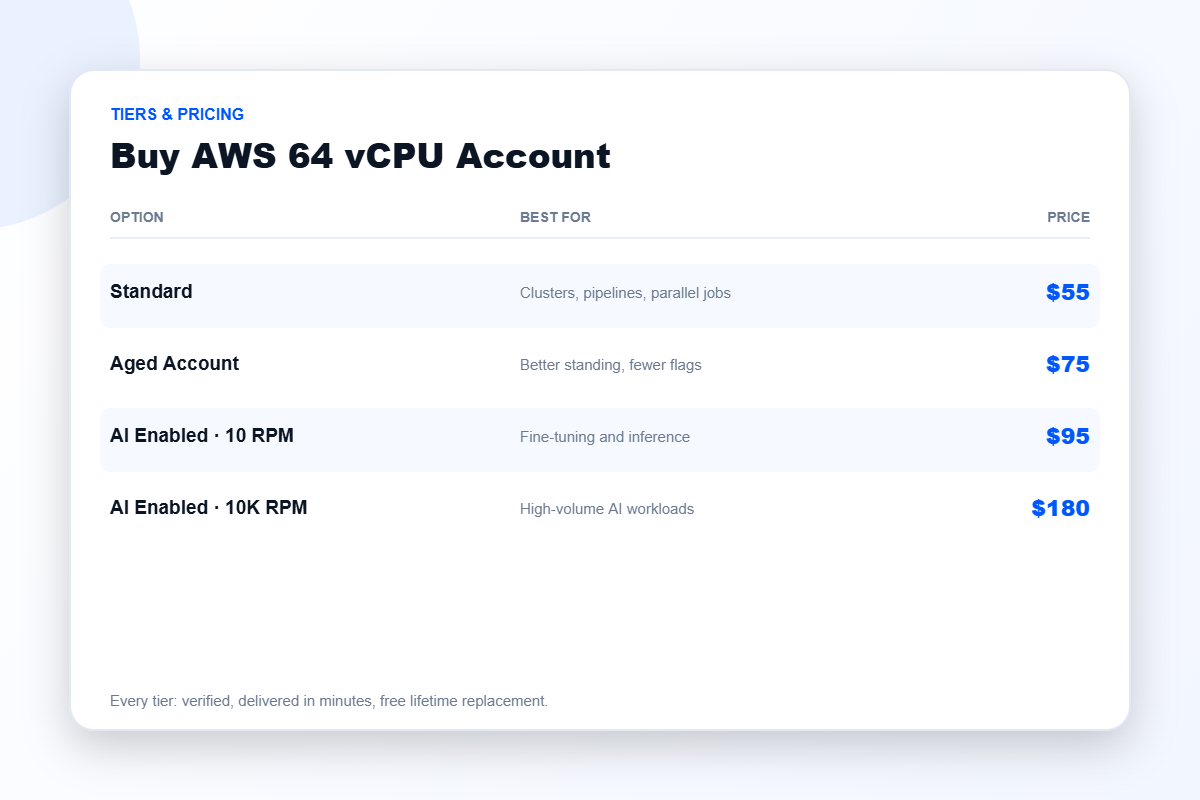
Standard — $55
Freshly verified, 64 vCPU quota approved, region of your choosing. This is the correct default for most buyers at this level.
Aged Account — $75
An account with real history behind it. Established accounts attract fewer automated risk flags, which matters more as your usage grows and starts to look unusual to a monitoring system that has never seen you before.
AI Enabled · 10 RPM — $95
Bedrock and SageMaker configured for modest request throughput — fine for fine-tuning, evaluation, and inference that is not yet serving production traffic.
AI Enabled · 10K RPM — $180
High request-per-minute throughput on AI services. If you are shipping an AI feature to actual users, this is the tier where rate limits stop being the bottleneck.
How to size this properly
Do not guess, and do not buy up “just in case” — that instinct costs people real money every week.
- List everything that runs concurrently. Production, staging, CI, workers, cron jobs, batch processing.
- Sum the peaks, not the averages. Averages conceal exactly the moment that breaks you.
- Add about thirty percent of headroom. Rolling deployments briefly double part of your footprint; this is the classic way to hit a ceiling you thought you had cleared.
- Round up to the next real tier.
If the arithmetic lands under 32, buy the 32 vCPU account and keep the difference — we would genuinely rather you did. If it lands well above 64, go to 128. There is a fuller treatment of all of this in our AWS service quotas guide.
Delivery, and what happens if something breaks
Delivery is automated. Median time from cleared payment to a working console is around nine minutes, and that figure does not degrade at night or at weekends because there is no human step in the chain.
Things do occasionally go wrong afterwards — cloud platforms are not perfectly predictable and any seller telling you otherwise is managing your expectations rather than informing you. Our commitment is the response: message support and we replace the account free, for as long as it is yours. That is written into the order.
Buying safely
The risk here is not the idea of buying a verified account — it is who you buy it from. The sellers who burn people are recognisable: no support after payment, no written replacement policy, prices that make no economic sense, and evasiveness about whether verification was actually completed.
Test us against that. Ask a hard question before you spend anything and time the reply. Our seven-point buying checklist spells out every question worth asking — including the ones we would rather you did not think to ask.
Frequently asked questions
Is 64 vCPU the same as 64 servers?
No. It is the total virtual CPU count you may run simultaneously. That could be one large instance, eight medium ones, or thirty small ones — the arithmetic is what matters, not the instance count.
Does the quota apply everywhere?
No — and this catches out more customers than anything else on this page. Service quotas are granted per region. Confirm your region with us before ordering.
Can I upgrade later?
You can buy a larger account at any time, and we will help you plan the migration. We do not, however, pretend that resizing an existing account’s quota is instant or guaranteed — it goes back into the same approval queue you bought this account to avoid.
What payment methods do you accept?
Major cards and popular digital payment methods through secure checkout. If you need an alternative, ask.
Explore the range
Compare against the 32 vCPU and 128 vCPU accounts, or look at an AWS account with credit if your real constraint is cost rather than capacity. The full catalogue lives in AWS accounts and cloud accounts. And if a cheaper provider would serve you better — which is more often than the industry likes to admit — we will tell you.
Disclaimer: BuyAWSAc.com is an independent reseller. We are not affiliated with, authorised by, or endorsed by Amazon Web Services, Inc.. All trademarks are the property of their respective owners. Buying a cleared account saves you the verification queue; it does not transfer responsibility. You remain accountable for operating within the platform’s terms of service and for whatever you deploy.
Reviews
There are no reviews yet.